
DocumentationOverview
No matching documentation
Support inside your product
Use the same DobroDesk conversation experience on the web and in native mobile apps. Start with one platform and keep the shared widget integration, identity and appearance configuration across integrations.
Choose your integration
Web widget
v0.3.1The browser widget for websites and web applications.
Modern browsers with JavaScript enabled
@dobrodesk/widgetIntegrate the web widgetiOS
v0.2.0Native Swift UI for UIKit or SwiftUI apps.
iOS 15.1 or later
Integrate iOSAndroid
v0.2.0Native Kotlin UI for Views or Jetpack Compose apps.
Android API 26 or later
Integrate AndroidFlutter
v0.2.0A typed Dart facade over the native mobile SDKs.
Flutter 3.22.3 and Dart 3.4 or later
dobrodesk_sdkIntegrate FlutterReact Native
v0.2.0A native module and screen for React Native apps.
React Native 0.76 to below 0.88
@dobrodesk/react-native-sdkIntegrate React NativeNativeScript
v0.2.0Typed TypeScript APIs backed by the native platform SDKs.
NativeScript 8.9 to below 10
@dobrodesk/nativescript-sdkIntegrate NativeScriptCapacitor
v0.2.0A native plugin for Capacitor iOS and Android projects.
Capacitor 6 to below 9
@dobrodesk/capacitor-sdkIntegrate CapacitorMobile SDK quick start
Native SDKs and framework wrappers follow the same integration flow. For the web widget, use the web platform guide.
Choose a platform
Use the native SDK for a Swift or Kotlin app. Use a wrapper when your app is built with Flutter, React Native, NativeScript or Capacitor.
Install the package
Follow the platform guide and pin the 0.2.0 package version. React Native Expo projects need a development build; Expo Go is not supported for this native module.
Connect the widget and identity
Create or select the DobroDesk widget channel and integration ID. Your backend signs the short-lived JWT. Never ship the signing secret in the application bundle.
Initialize once
Create the SDK instance during application setup, provide the shared widget integration and appearance configuration, then keep the instance for the app session.
Present the conversation
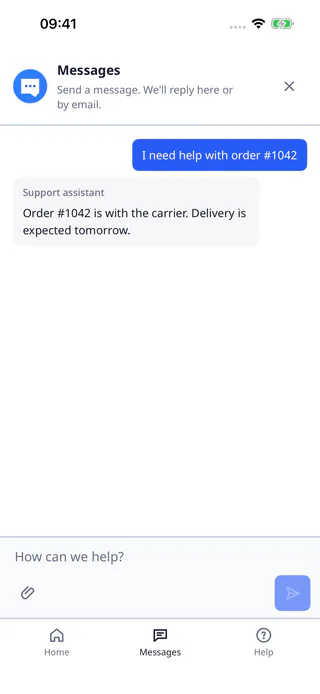
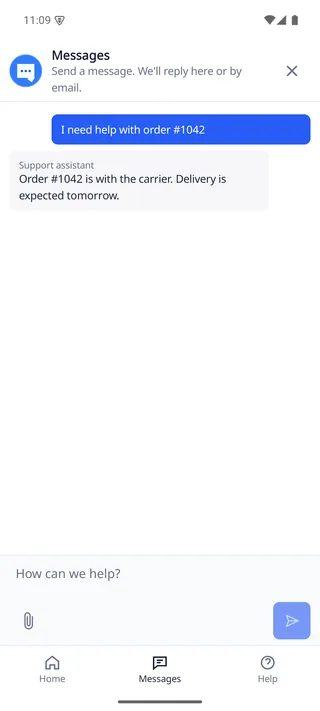
Open the native conversation screen from your support action. The UI follows the web widget's behavior while using platform-native navigation, keyboard and input controls.
End the account session
Use logout for the Flutter, React Native, NativeScript and Capacitor wrappers. For direct Swift or Kotlin clients, call resetSession(), discard the client and create a new one before changing accountScope. Clear any screen state that belongs to the previous user.
Native SDK previews
See the same support conversation flow rendered with native iOS and Android controls.
Common guides
Identity and signed sessions
Create short-lived JWTs on your server and keep secrets out of the app.
Appearance and accessibility
Use shared branding with native controls, reduced motion and system settings.
Offline and delivery
Understand drafts, queued messages, retries and delivery confirmation.
Optional capabilities
Add push notifications or voice only when your app needs them.
Mobile SDK FAQ
Find answers about versions, sessions, permissions and updates.
Supported versions
These are the supported floors and framework ranges for the 0.2.0 release. Check the release notes before upgrading your application.
- iOS
- 15.1 or later
- Android
- API 26 or later
- Flutter
- Flutter 3.22.3+, Dart 3.4+
- React Native
- 0.76 to below 0.88
- NativeScript
- 8.9 to below 10
- Capacitor
- 6 to below 9
- Web widget
- Web widget 0.3.1
Frequently asked questions
Can I use the SDK without push notifications or voice?
Yes. Push and voice are optional capabilities. The base conversation SDK does not require their native permissions or provider setup.
Where should I create the JWT?
Create it on your backend with the integration-specific identity secret returned by the Widget channel's Copy identity secret control. Return a short-lived token to the app. Do not put that secret in iOS, Android or JavaScript code.
What happens when the network is unstable?
The SDK keeps a message in its local pending state until it has a delivery result. It can queue work while offline and exposes the state needed to retry without silently sending a duplicate.
Is the mobile UI a WebView of the web widget?
No. The mobile SDK uses native iOS and Android UI. It shares the DobroDesk appearance and conversation behavior with the web widget while retaining native navigation, keyboard and accessibility interactions.
Can I use it in Expo Go?
No. React Native integrations use native modules. Expo projects need a development build or a prebuilt native project before the SDK can be installed.
Versions and packages
Mobile SDK 0.2.0 is distributed through the platform package registries and the public release bundle. The Android release bundle uses a local Maven repository. The native UI is implemented by the iOS and Android SDKs; wrappers do not load the web widget in a WebView.