Inside DobroDesk

Everything your team needs to answer well.

Share the queue, check the conversation history and prepare the next reply.

No card needed today.

Build the path, then let it run

Dobrik points to the features in this support workspace
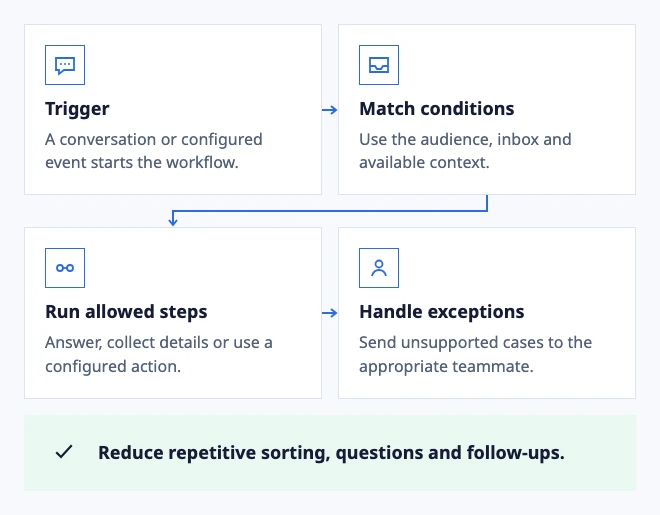
Build the path, then let it run
  • Trigger: A conversation or configured event starts the workflow.
  • Match conditions: Use the audience, inbox and available context.
  • Run allowed steps: Answer, collect details or use a configured action.
  • Handle exceptions: Send unsupported cases to the appropriate teammate.

Reduce repetitive sorting, questions and follow-ups.

Illustrated workflow: conditions select the next action.

Inbox with real ownership

Route every conversation to an Inbox with an owner and SLA.

Live chat software that keeps the conversation with your team

Add a support chat widget to your website. Give visitors a way to ask for help and let your team handle the conversation in a shared inbox.

Customer and company context

Keep identity, company, notes and history beside the active conversation.

AI drafts with visible evidence

Review the sources and risk behind every prepared draft.

Scoped knowledge and AI policy

Scope sources and test answers before expanding autonomy.

Analytics for support and AI

Compare response time and SLA with AI outcomes and handoffs.

Customer knowledge base software with a published Help Center

Create approved support articles, publish a searchable Help Center and decide separately which knowledge AI may use in customer conversations.

Procedures for repeatable support work

Configure a defined workflow, test its provider result and hand off exceptions with context.

Customer actions with confirmation

Let customers take a configured next step when the provider, permissions and outcome are clear.

Voice conversations and transcripts

Offer an explicit browser voice path and review the recording or transcript with the case.

Multilingual support with the original in view

Translate for understanding while keeping the customer message and human review available.

See how your team handles support

Assign every request

Give each request an owner and keep the handoff in the conversation.

  • Separate Inboxes for support, payments and operations.
  • Private notes keep handoffs inside the conversation.
Explore the shared inbox
Assign every request

Keep customer details beside the request

Open the customer or company record from a request and keep contact details close to the reply.

  • Contacts and companies together in your workspace.
  • Search and filters help you find the right account.
Explore customer support tools
Keep customer details beside the request

Customer and payment details

Connect HubSpot or Stripe to see customer and payment details while you reply.

  • Calendly and Google Calendar add booking context.
  • Gmail integration is in development.
Explore integrations
Customer and payment details

Drafts and automatic replies

AI uses approved articles and documents. Review a draft before sending or set rules for automatic replies.

  • Review sources and edit a draft before sending.
  • Choose when automatic replies are allowed and when a person is needed.
See how AI support works
Drafts and automatic replies
Dobrik celebrates a clearer way to resolve customer questions

Start with one inbox

Connect email or add chat to your website.

Choose a support address or place the widget on your site. Then assign requests and reply from the conversation.

No card needed today.