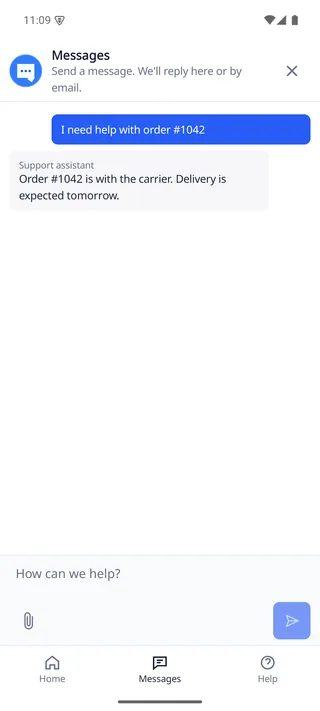
Your Android app presents the DobroDesk widget with protected account-scoped state and explicit retry behavior.
Install the Android release bundle
Download https://github.com/comstud-io/dobrodesk-mobile-sdk/releases/download/v0.2.0/dobrodesk-mobile-sdk-0.2.0-bundle.tar.gz and extract it into a stable directory checked into neither your app source nor a public upload. The archive keeps the local Maven repository at native/maven. Register that directory from the host settings file so Gradle projects using FAIL_ON_PROJECT_REPOS remain valid. This Mobile SDK 0.2.0 release adds inline native surfaces and wrapper fixes. It also includes the Android protected-storage outbox fix. The public API and native UI contract remain compatible.
Android API 26 and later is supported. The base artifacts do not fetch from Maven Central. Voice and push are separate opt-in coordinates and should not be added unless the host is also prepared to own the corresponding permissions and providers.
Use the tested direct Android host tuple for the native Android example: Android Gradle Plugin 8.13.2, Kotlin Gradle Plugin 2.2.0, Gradle 8.14.3 and Java 17 with compileSdk 36 and minSdk 26. For another current Android project, keep the versions generated by its Android or framework release when they are compatible with the SDK.
import org.gradle.api.initialization.resolve.RepositoriesMode

dependencyResolutionManagement {
  repositoriesMode.set(RepositoriesMode.FAIL_ON_PROJECT_REPOS)
  repositories {
    google()
    mavenCentral()
    maven { url = uri("<extracted-bundle>/native/maven") }
  }
}

// android/app/build.gradle.kts
android {
  compileSdk = 36
  defaultConfig { minSdk = 26 }
  compileOptions {
    sourceCompatibility = JavaVersion.VERSION_17
    targetCompatibility = JavaVersion.VERSION_17
  }
}
Declare the three base Android artifacts
The extracted local repository contains the engine, UI controller and UI AAR coordinates. Declare all three in the app module. The wrapper does not add a project-level repository or silently include the optional voice and push modules.
dependencies {
  implementation("com.dobrodesk:dobrodesk-sdk:0.2.0")
  implementation("com.dobrodesk:dobrodesk-ui-controller:0.2.0")
  implementation("com.dobrodesk:dobrodesk-ui:0.2.0")
}
Present from a foreground Activity
The following host-owned functions call your backend token endpoint and return the current customer's stable ID and short-lived identity JWT. The SDK presents only while the Activity is in the foreground.
import android.os.Bundle
import androidx.activity.ComponentActivity
import androidx.lifecycle.lifecycleScope
import com.dobrodesk.sdk.DobroDeskConfiguration
import com.dobrodesk.sdk.ui.DobroDeskAndroidClientFactory
import com.dobrodesk.sdk.ui.DobroDeskWidgetBridgePresenter
import java.time.Duration
import kotlinx.coroutines.launch

class MainActivity : ComponentActivity() {
  private var presenter: DobroDeskWidgetBridgePresenter? = null
  private val client by lazy {
    DobroDeskAndroidClientFactory.create(
      context = this,
      configuration = DobroDeskConfiguration(
        apiOrigin = "https://dobrodesk.com",
        integrationId = "wgt_0123456789abcdef0123456789abcdef",
        accountScope = currentCustomerId(),
        credentialProvider = { loadDobroDeskToken() },
        pollInterval = Duration.ofSeconds(1),
      ),
    )
  }

  override fun onCreate(state: Bundle?) {
    super.onCreate(state)
    lifecycleScope.launch {
      presenter = DobroDeskWidgetBridgePresenter.present(
        activity = this@MainActivity,
        client = client,
        options = mapOf("locale" to "en"),
        onClosed = { presenter = null },
      )
    }
  }

  override fun onDestroy() {
    presenter?.detach()
    presenter = null
    super.onDestroy()
  }
}
Embed the widget or use your own trigger
For an inline surface, pass the foreground Activity and an already attached FrameLayout to the suspend helper. It builds the required JsonObject options, attaches the returned handle on the main dispatcher and closes the handle if the host detaches before or after mounting.
A host-owned Button can open a modal presenter or call setVisible on the embedded handle. Keep the default launcher out of the layout when the app owns the trigger and preserve the same client for navigation remounts.
The inline presenter APIs are included in the published Mobile SDK 0.2.0 artifacts. Use the inline surface when the host owns placement and use modal presentation when it should manage the full screen.
import android.app.Activity
import android.view.View
import android.view.ViewGroup
import android.widget.FrameLayout
import com.dobrodesk.sdk.DobroDeskClient
import com.dobrodesk.sdk.ui.DobroDeskWidgetBridgePresenter
import com.dobrodesk.sdk.ui.DobroDeskWidgetEmbeddedHandle
import kotlinx.coroutines.Dispatchers
import kotlinx.coroutines.withContext
import kotlinx.serialization.json.buildJsonObject
import kotlinx.serialization.json.put

suspend fun mountSupportPanel(
  activity: Activity,
  client: DobroDeskClient,
  supportContainer: FrameLayout,
): DobroDeskWidgetEmbeddedHandle? {
  check(supportContainer.isAttachedToWindow) {
    "Attach the support container before mounting the widget"
  }
  var embeddedHandle: DobroDeskWidgetEmbeddedHandle? = null
  val detachListener = object : View.OnAttachStateChangeListener {
    override fun onViewAttachedToWindow(view: View) = Unit
    override fun onViewDetachedFromWindow(view: View) {
      embeddedHandle?.close()
    }
  }
  val handle = DobroDeskWidgetBridgePresenter.createEmbedded(
    activity = activity,
    client = client,
    options = buildJsonObject {
      put("locale", "en")
      put("view", "home")
    },
    onClosed = {
      supportContainer.removeOnAttachStateChangeListener(detachListener)
      embeddedHandle = null
    },
  )
  embeddedHandle = handle
  var attached = false
  withContext(Dispatchers.Main.immediate) {
    if (supportContainer.isAttachedToWindow && !activity.isFinishing && !activity.isDestroyed) {
      supportContainer.addView(
        handle.view,
        ViewGroup.LayoutParams(
          ViewGroup.LayoutParams.MATCH_PARENT,
          ViewGroup.LayoutParams.MATCH_PARENT,
        ),
      )
      supportContainer.addOnAttachStateChangeListener(detachListener)
      handle.setVisible(true)
      attached = true
    }
  }
  if (!attached) {
    handle.close()
    return null
  }
  return handle
}
Handle Android lifecycle and identity
credentialProvider is a host-provided suspend function that returns a short-lived customer identity JWT. Native code protects the durable outbox with Android Keystore and scopes it by accountScope. Do not persist a support API token in app preferences.
Call presenter.close() when the host screen is disposed and client.resetSession() when a customer discards a conversation. The direct Android client has no logout method: reset it, discard it and create a new client before changing accountScope. Framework wrappers expose logout and perform this cleanup for their native client. The widget follows the system reduced-motion setting when no explicit override is supplied.
Handle loading, detachment and accessibility
The native widget renders message loading, assistant waiting and retry states inside its surface. Use the client events for a surrounding screen state and keep the host view mounted while a pending send is reconciled.
Call setVisible(false) when a route is covered and setVisible(true) after the same view is attached again. close preserves the session, draft and outbox. It does not replace resetSession. The widget follows system animation scale and reduced-motion preferences unless an explicit override is supplied, while the host remains responsible for window insets and keyboard resizing.
- Keep one DobroDeskWidgetEmbeddedHandle per client and guard creation while an inline handle is already open.
- Call setVisible(false) during temporary detachment and setVisible(true) after reattachment.
- Call close only when the surface ends. Reset or logout the client only for an intentional account or conversation change.
Verify the Android flow
- Present from a foreground Activity and confirm that a repeated tap does not create overlapping presenters.
- Send a message with a stable idempotency key, background the app and reopen it. Confirm that the pending message is retried with the same key after the network returns.
- Use resetSession before a deliberate discard. Before an account switch, reset and discard the direct client, then create a new client for the next account. Confirm that the next account starts with an empty conversation.