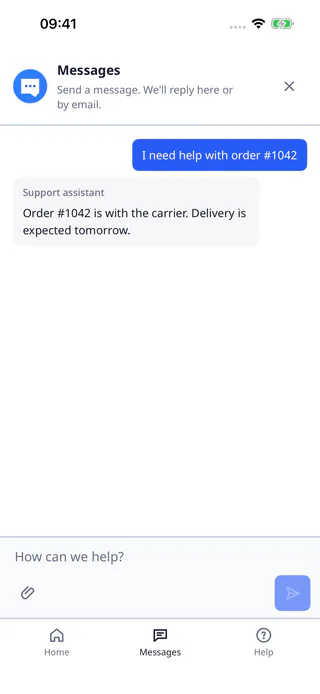
Your iOS app presents the native DobroDesk widget with account-scoped durable state and system motion preferences.
Add the published Swift Package
In Xcode add the package repository https://github.com/comstud-io/dobrodesk-mobile-sdk.git at the 0.2.0 release and add DobroDeskSDK and DobroDeskUI to the app target. The binary package supports iOS 15.1 and later. The release is artifact-only and the native implementation source is not included.
https://github.com/comstud-io/dobrodesk-mobile-sdk.gitInitialize and present the native client
The app must supply a short-lived customer identity JWT through credentialProvider. Native authentication is signed-user only: use a host backend endpoint and never ship a signing secret or a support API token in the app.
With Swift 6 strict concurrency, declare the host loader as a @Sendable () async throws -> String closure and pass that closure to credentialProvider.
import Foundation
import UIKit
import DobroDeskSDK
import DobroDeskUI

let loadDobroDeskToken: @Sendable () async throws -> String = {
  // Replace this placeholder with a request to your host backend.
  "short-lived-token-from-host-backend"
}

let client = try DobroDeskClient(
  configuration: DobroDeskConfiguration(
    apiOrigin: URL(string: "https://dobrodesk.com")!,
    integrationId: "wgt_0123456789abcdef0123456789abcdef",
    accountScope: currentCustomer.id,
    locale: "en",
    credentialProvider: loadDobroDeskToken,
    pollInterval: 1
  )
)

try await DobroDeskWidgetBridgePresenter.shared.present(
  client: client,
  options: ["locale": "en"],
  from: viewController
)
Embed the widget or use your own trigger
For an inline surface, add a UIView to the visible view controller with safe-area leading and trailing constraints, a top anchor and a keyboard-layout-guide bottom anchor. Give its 560-point height constraint defaultHigh so the host can resize when the keyboard appears, then wait until it is attached to the window before calling embed. Use a presenter owned by this surface so a failed or stale mount cannot close another surface.
Keep the default launcher out of the host layout when the app owns the trigger. A custom UIButton can call present for a modal surface or reveal the embedded view with setEmbeddedVisible. The host wrapper should catch embed errors with do/catch and forward them to its own typed onError callback for recovery UI. Do not create another client for a second screen.
The inline presenter APIs are included in the published Mobile SDK 0.2.0 artifacts. Use the inline surface when the host owns placement and use modal presentation when it should manage the full screen.
import UIKit
import DobroDeskSDK
import DobroDeskUI

@MainActor
final class SupportPanelHost {
  private let client: DobroDeskClient
  private weak var parent: UIViewController?
  private let onError: (Error) -> Void
  private let supportContainer = UIView()
  private var presenter: DobroDeskWidgetBridgePresenter?
  private var mountTask: Task<Void, Never>?
  private var mountGeneration = 0
  private var isMounted = false

  init(
    client: DobroDeskClient,
    parent: UIViewController,
    onError: @escaping (Error) -> Void
  ) {
    self.client = client
    self.parent = parent
    self.onError = onError
    supportContainer.translatesAutoresizingMaskIntoConstraints = false
    parent.view.addSubview(supportContainer)
    let safeArea = parent.view.safeAreaLayoutGuide
    let keyboardGuide = parent.view.keyboardLayoutGuide
    let height = supportContainer.heightAnchor.constraint(equalToConstant: 560)
    height.priority = .defaultHigh
    NSLayoutConstraint.activate([
      supportContainer.topAnchor.constraint(equalTo: safeArea.topAnchor),
      supportContainer.leadingAnchor.constraint(equalTo: safeArea.leadingAnchor),
      supportContainer.trailingAnchor.constraint(equalTo: safeArea.trailingAnchor),
      supportContainer.bottomAnchor.constraint(equalTo: keyboardGuide.topAnchor),
      height,
    ])
  }

  func mountAfterAppearance() {
    guard mountTask == nil, !isMounted, let parent, supportContainer.window != nil else { return }
    mountGeneration += 1
    let generation = mountGeneration
    let mountPresenter = DobroDeskWidgetBridgePresenter()
    let client = self.client
    let supportContainer = self.supportContainer
    presenter = mountPresenter
    mountTask = Task { @MainActor [weak self] in
      defer {
        if let self, self.mountGeneration == generation {
          self.mountTask = nil
        }
      }
      do {
        try await mountPresenter.embed(
          client: client,
          options: ["locale": "en", "view": "home"],
          in: supportContainer,
          parent: parent
        )
        guard let self, self.mountGeneration == generation else {
          mountPresenter.close()
          return
        }
        isMounted = true
      } catch {
        guard let self, self.mountGeneration == generation else { return }
        mountPresenter.close()
        presenter = nil
        onError(error)
      }
    }
  }

  func setVisible(_ visible: Bool) {
    guard isMounted else { return }
    presenter?.setEmbeddedVisible(visible)
  }

  func close() {
    mountGeneration += 1
    mountTask?.cancel()
    mountTask = nil
    presenter?.close()
    presenter = nil
    isMounted = false
  }
}
Keep presentation and account lifecycle explicit
Present from a foreground UIViewController and call the owning SupportPanelHost.close() when your host screen is disposed. Call client.resetSession() when the customer intentionally discards the conversation. The direct iOS client has no logout method: reset it, discard it and create a new client before changing accountScope. Framework wrappers expose logout and perform this cleanup for their native client.
The native presenter uses the same widget appearance contract as the web widget. Omit reduceMotion unless the customer has made an explicit in-app choice. The system reduced-motion setting remains authoritative.
Handle loading, detachment and accessibility
The native surface owns message loading and retry indicators. Keep your host activity indicator for surrounding work and subscribe to the shared client events when the screen needs a page-level state. Set embedded visibility when a route is hidden and restore it after reattachment.
Detaching or closing an inline surface must preserve the client, session, draft and pending outbox. Call close only for the surface, not resetSession. The presenter follows the system Reduce Motion setting unless your product explicitly passes an override, and UIKit safe areas and keyboard insets remain host-owned.
- Call setEmbeddedVisible(false) when the route is covered and keep the client alive.
- Call setEmbeddedVisible(true) after the same container is attached again.
- Call close only when the account or host flow ends, then create a new client after an intentional reset or logout.
Verify the iOS flow
- Open the widget from a foreground screen and confirm that the first presentation does not create a second controller when the button is tapped twice.
- Start a conversation, close and reopen the widget, then confirm that the draft and pending send remain scoped to the same account.
- Rotate or background the app during a pending operation and wait for the explicit reconnecting or retry state before trying again.
- Reset and discard the direct client before switching accounts, then create the next client and confirm that it cannot see the previous conversation.