Customer context

A customer service workspace that keeps context beside the reply

Bring customer, company and conversation history into one support workspace so teammates can decide what to do next without asking for the same details again.

No card needed today.

Know who you are helping

Dobrik points to the customer context behind each conversation
Know who you are helping
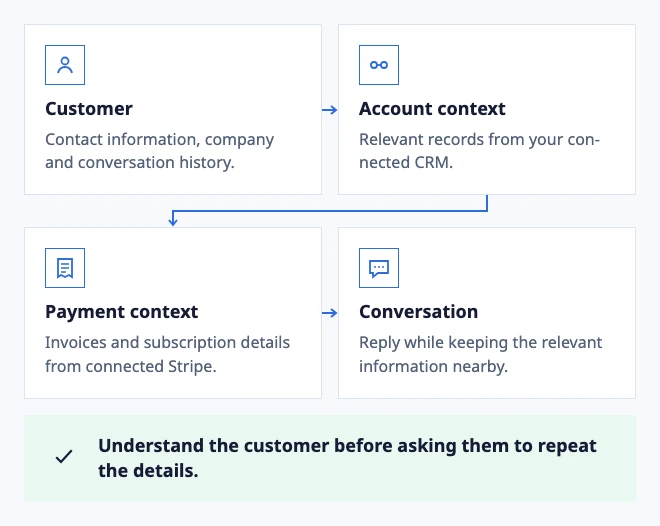
  • Customer: Contact information, company and conversation history.
  • Account context: Relevant records from your connected CRM.
  • Payment context: Invoices and subscription details from connected Stripe.
  • Conversation: Reply while keeping the relevant information nearby.

Understand the customer before asking them to repeat the details.

Illustrated customer context, with connected services configured.

In the workflow

What changes once the work is visible.

  1. 01

    Put useful customer context beside the request

  2. 02

    Make a handoff without making the customer repeat the case

  3. 03

    Keep connected data useful without making it authoritative

Put useful customer context beside the request

A support reply often depends on more than the latest message. Show the customer, company, previous conversations and connected context beside the active thread so the teammate can understand the request before replying.

Keep customer-authored details and provider data visibly distinct from internal notes. The workspace should make clear what can inform a reply and what remains private to the team.

See customer context in a shared Inbox

Make a handoff without making the customer repeat the case

When billing, delivery or product work needs another team, change the owner or Inbox while keeping the same conversation. The next teammate sees earlier answers, private notes, attachments and the unresolved request.

Use the customer record to confirm who is asking and the timeline to confirm what has already been promised. Do not copy sensitive details into a second tool just to explain a handoff.

Follow a support handoff with shared ownership

Keep connected data useful without making it authoritative

A connected CRM, billing record or order lookup can shorten a search, but it does not decide the answer by itself. Check the source and its freshness before using account, payment or access information in a reply.

For sensitive changes and exceptions, keep an authorized person in control. Customer context should improve the decision, not hide who made it or why.

Measure where context improves support
Dobrik celebrates a clearer way to resolve customer questions

Start with one inbox

Connect email or add chat to your website.

Choose a support address or place the widget on your site. Then assign requests and reply from the conversation.

No card needed today.