Support procedures

Automate a defined support procedure with a visible next step

Turn a repeatable support flow into a configured Procedure with conditions, provider actions and a clear human handoff when the request falls outside its scope.

No card needed today.

Build the path, then let it run

Dobrik points to the features in this support workspace
Build the path, then let it run
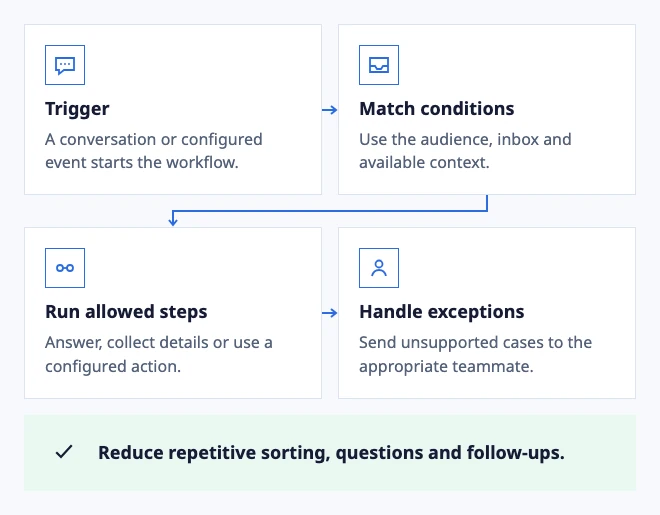
  • Trigger: A conversation or configured event starts the workflow.
  • Match conditions: Use the audience, inbox and available context.
  • Run allowed steps: Answer, collect details or use a configured action.
  • Handle exceptions: Send unsupported cases to the appropriate teammate.

Reduce repetitive sorting, questions and follow-ups.

Illustrated workflow: conditions select the next action.

In the workflow

What changes once the work is visible.

  1. 01

    Start with a task that has a clear finish

  2. 02

    Let the customer and the team see what happened

  3. 03

    Pilot one procedure with real edge cases

Start with a task that has a clear finish

A good procedure has a known input, a small number of decisions and an outcome a customer can understand. Examples include collecting details for a support request, checking availability or creating a configured follow-up.

Keep the provider, permissions and expected result visible in the configuration. Test the success path, missing information and provider failure before exposing the procedure in a widget or workflow.

Configure and test procedures and actions

Let the customer and the team see what happened

A procedure should confirm the provider result instead of implying success after a button click. If a step cannot be completed, keep the conversation available for a teammate with the collected details.

Do not use an automation to hide a decision that changes money, access, privacy or security. Make the required approval part of the workflow.

Test a customer-facing procedure

Pilot one procedure with real edge cases

Start with a small test set: complete data, a missing field, a provider timeout and a request for a teammate. Record which step needs clearer copy or a different owner.

Publish the procedure only after the expected outcome and the fallback are understandable to someone who did not configure it.

Run a procedure test
Dobrik celebrates a clearer way to resolve customer questions

Start with one inbox

Connect email or add chat to your website.

Choose a support address or place the widget on your site. Then assign requests and reply from the conversation.

No card needed today.