Commerce support

Help shoppers with order context beside the conversation

Bring configured customer and order context into support, answer delivery questions faster and keep changes or checkout actions behind an explicit Procedure.

No card needed today.

Answer with the order in view

Dobrik points to the integrations that connect your support work
Answer with the order in view
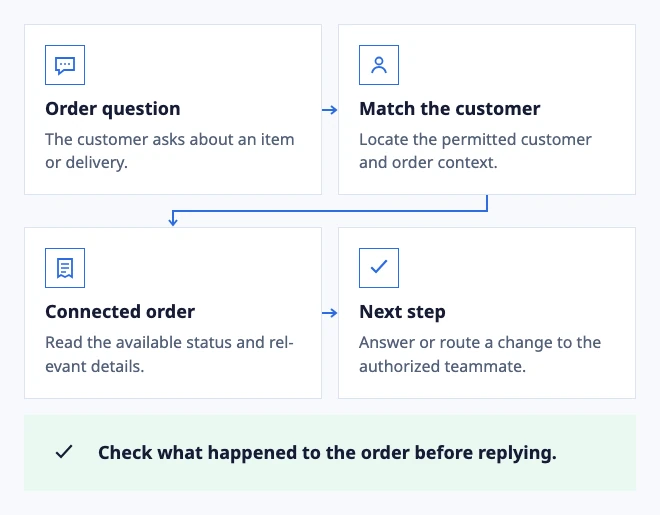
  • Order question: The customer asks about an item or delivery.
  • Match the customer: Locate the permitted customer and order context.
  • Connected order: Read the available status and relevant details.
  • Next step: Answer or route a change to the authorized teammate.

Check what happened to the order before replying.

Example: a store support question with connected commerce data.

In the workflow

What changes once the work is visible.

  1. 01

    Answer the question behind the order number

  2. 02

    Route delivery and payment questions separately

  3. 03

    Make the customer-facing next step explicit

Answer the question behind the order number

A shopper may ask where an order is, whether a payment was received or what information is needed for a return. Connect the provider that holds the relevant customer context and keep the source visible while the teammate answers.

Read-only context can shorten the lookup. A write or checkout action should run only through a configured Procedure with the required permissions and a clear customer confirmation.

Connect customer and order context

Route delivery and payment questions separately

Delivery updates, payment questions and product advice often need different owners. Route each request to the Inbox that can resolve the next step while retaining the same customer history when another team joins.

Use AI to find an approved policy or prepare an explanation. Refunds, account changes and uncertain exceptions remain an explicit human decision.

See the billing and invoice workflow

Make the customer-facing next step explicit

A lookup is useful only when it becomes a clear answer: an expected delivery update, the detail still needed or the person who will resolve the exception. Keep that next step in the same conversation.

Test a normal order question and a provider response that lacks the required context before publishing the flow.

Test connected order context
Dobrik celebrates a clearer way to resolve customer questions

Start with one inbox

Connect email or add chat to your website.

Choose a support address or place the widget on your site. Then assign requests and reply from the conversation.

No card needed today.