Connected actions

Move from an answer to a configured customer action

Give customers a safe next step inside the conversation by connecting approved providers and requiring the confirmation and permissions that the action needs.

No card needed today.

A conversation can move work forward

Dobrik points to the integrations that connect your support work
A conversation can move work forward
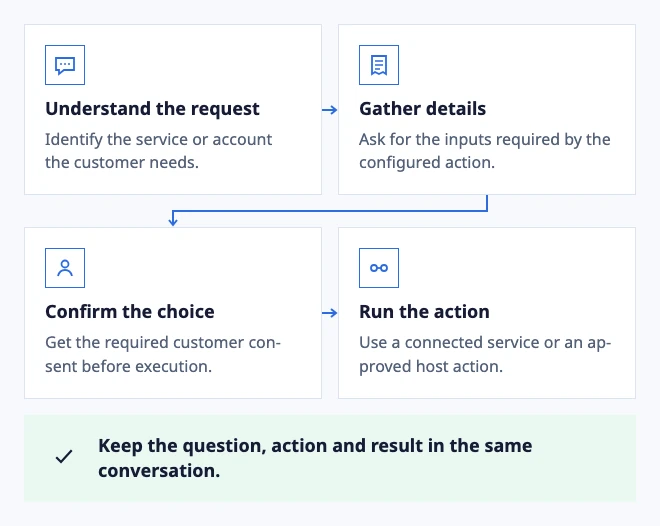
  • Understand the request: Identify the service or account the customer needs.
  • Gather details: Ask for the inputs required by the configured action.
  • Confirm the choice: Get the required customer consent before execution.
  • Run the action: Use a connected service or an approved host action.

Keep the question, action and result in the same conversation.

Example: a configured action turns a request into an outcome.

In the workflow

What changes once the work is visible.

  1. 01

    Describe the action before it runs

  2. 02

    Use actions where the next step is unambiguous

  3. 03

    Design the failed action as carefully as the successful one

Describe the action before it runs

A customer should know what a connected action will do, which details will be used and what result to expect. Put the confirmation after the summary and show the provider outcome in the conversation.

Actions are available only when the required provider, permissions and Procedure are configured. A failed call should return a useful retry or human-support path.

Define a connected action and its boundaries

Use actions where the next step is unambiguous

Appointment requests and other narrowly defined service flows can be easier for a customer to complete in chat. Keep policy questions, exceptions and sensitive account changes with the team that owns them.

Review completed and failed procedure runs so you can improve the source instructions, provider setup or handoff instead of adding more prompts.

See appointment booking in a conversation

Design the failed action as carefully as the successful one

A customer needs a useful explanation when availability, permissions or a provider call fails. Preserve the collected details and offer a retry or human handoff instead of implying that the action completed.

Review failed runs regularly to improve the procedure and its customer wording.

Review action outcomes
Dobrik celebrates a clearer way to resolve customer questions

Start with one inbox

Connect email or add chat to your website.

Choose a support address or place the widget on your site. Then assign requests and reply from the conversation.

No card needed today.