Appointments in chat

Let customers book the next step while the conversation is open

Offer available appointment times in the website widget through a configured Procedure and connected calendar, then keep the request and confirmation in one conversation.

No card needed today.

From a question to a confirmed time

Dobrik helps turn a customer request into a booking
From a question to a confirmed time
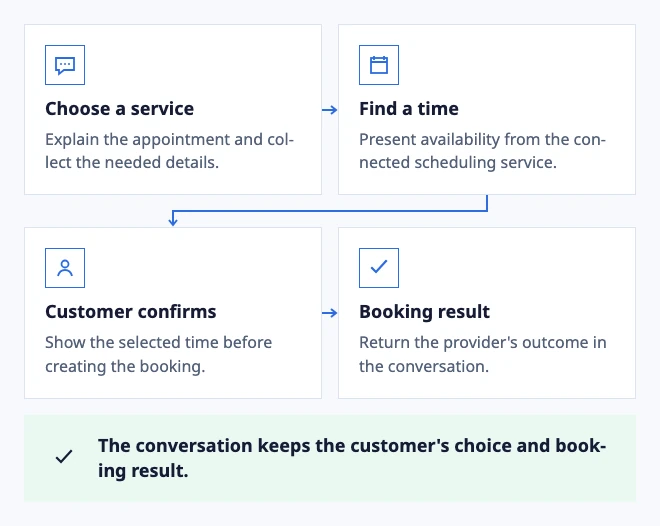
  • Choose a service: Explain the appointment and collect the needed details.
  • Find a time: Present availability from the connected scheduling service.
  • Customer confirms: Show the selected time before creating the booking.
  • Booking result: Return the provider's outcome in the conversation.

The conversation keeps the customer's choice and booking result.

Illustrated booking with a configured service and available time slots.

In the workflow

What changes once the work is visible.

  1. 01

    Turn a support question into a scheduled next step

  2. 02

    Keep exceptions with the team

  3. 03

    Confirm the outcome and the follow-up

Turn a support question into a scheduled next step

A customer can ask for a consultation, choose a service and see available times in the website widget. The flow should explain the local time zone and show the details again before the customer confirms the request.

Availability and booking come from a connected calendar and a published Procedure. A date choice alone is not a booking. The conversation should show the provider result or a clear retry message.

Set up and test appointment booking

Keep exceptions with the team

When no slot fits, the customer needs a different service or the calendar returns an error, route the conversation to the responsible Inbox with the collected context. The person should not need to reconstruct the request from a failed flow.

Use the widget for a defined booking procedure and keep unusual changes, cancellations and policy questions with an authorized teammate.

Connect widget conversations to your team

Confirm the outcome and the follow-up

After a successful booking, show the service, local time and reference the customer can use later. If the provider cannot confirm the appointment, tell the customer what to expect and keep a human route available.

Run the complete flow from the same public website address before launch, including a second attempt after a failed availability check.

Verify the appointment result
Dobrik celebrates a clearer way to resolve customer questions

Start with one inbox

Connect email or add chat to your website.

Choose a support address or place the widget on your site. Then assign requests and reply from the conversation.

No card needed today.