
Voice conversations

Give customers a voice path and keep the transcript with the case

Let a visitor explicitly start browser voice in the website widget, then give the team a recording or transcript they can review alongside the support conversation.

No card needed today.

A spoken question becomes usable context

Dobrik helps with a spoken customer question
A spoken question becomes usable context
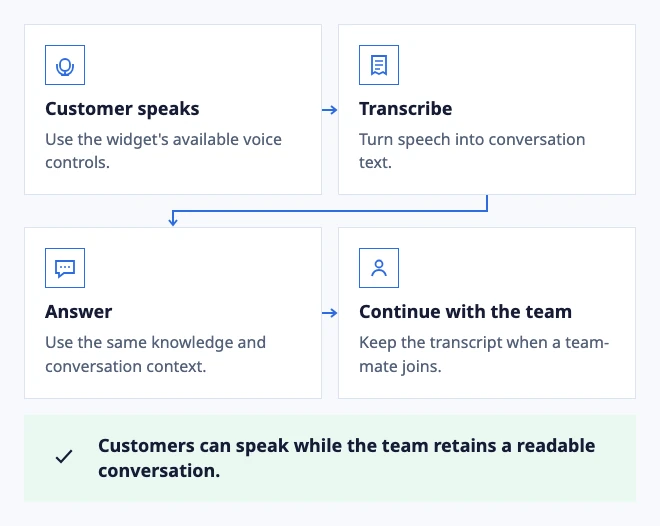
  • Customer speaks: Use the widget's available voice controls.
  • Transcribe: Turn speech into conversation text.
  • Answer: Use the same knowledge and conversation context.
  • Continue with the team: Keep the transcript when a teammate joins.

Customers can speak while the team retains a readable conversation.

Example: voice in the website widget, with the channel enabled.

In the workflow

What changes once the work is visible.

  1. 01

    Make voice an explicit choice

  2. 02

    Review the transcript before sharing it

  3. 03

    Turn a voice call into an owned follow-up

Make voice an explicit choice

Some customers can explain a problem faster by voice. Let them start the microphone deliberately, show the current mode and give a text fallback when permission or the browser blocks the microphone.

The widget should make it clear when a person is available and what happens after the voice session ends. A support team needs a conversation it can own, not an audio control disconnected from the queue.

Use browser voice safely in the widget

Review the transcript before sharing it

When a recording and transcript are available, check speaker labels, timestamps and gaps before using the result in a summary. A failed transcription should remain an explicit unavailable state rather than an invented sentence.

Keep the original conversation and human follow-up available for a caller who needs an account, billing or safety decision.

Review voice conversations and transcripts

Turn a voice call into an owned follow-up

A transcript is useful when it points to the request, promise or unresolved detail that needs action. Assign the conversation and keep the original audio or unavailable state visible to the reviewer.

Use a text reply or human callback when the caller needs a sensitive account, payment or security decision.

Review voice follow-up
Dobrik celebrates a clearer way to resolve customer questions

Start with one inbox

Connect email or add chat to your website.

Choose a support address or place the widget on your site. Then assign requests and reply from the conversation.

No card needed today.